DarkHorse CRM · for real estate investors

Close more deals with the tools you already pay for.

DarkHorse runs your pipeline, buyers, follow-up and paperwork in one place, and plugs into the dialer, calendar and inbox you already use. Built for investors who do wholesale, flips, creative finance and buy-and-hold.

14 days free, then monthly or annual. Every feature on every plan. Cancel from Settings any time.

  • Wholesale
  • Fix and flip
  • Subject-to
  • Seller finance
  • Novation
  • Lease option
  • Buy and hold
  • Joint ventures
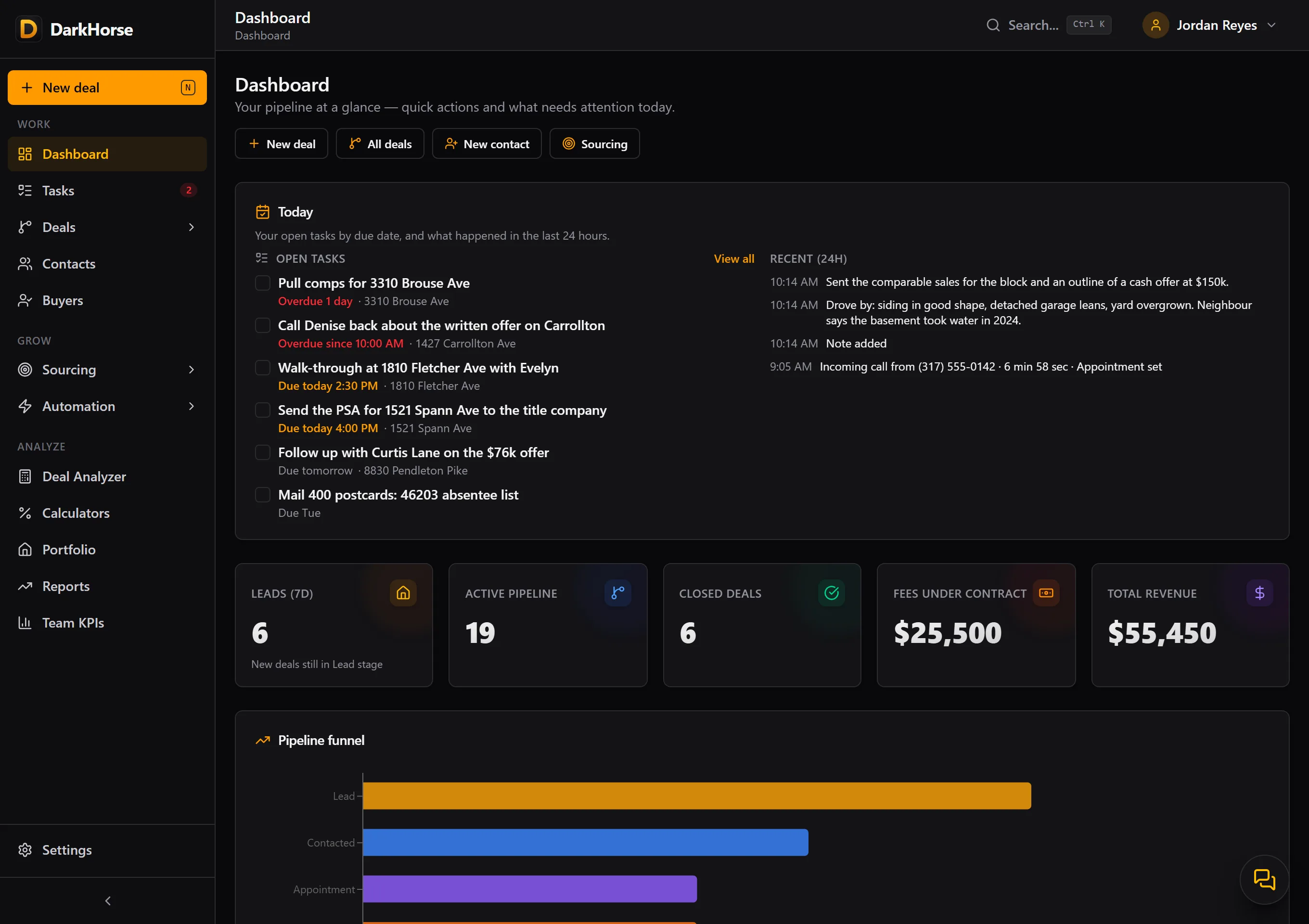
The DarkHorse CRM dashboard: active deals, closed revenue and projected fees, today's tasks and the pipeline by stage.

What you get

The whole deal, in one place

Pictures of the real app, not mock-ups. Every one of these comes with every plan.

Pipeline

One pipeline, from first call to closing table

Every lead, offer and contract on one board, in the stages you actually use inside six built-in phases. Tasks with email reminders keep the follow-up honest, so nothing slips between a spreadsheet and a group text.

  • Your own stage names, saved views and filters, and bulk changes on up to 200 deals or contacts at a time
  • CSV import that shows what it will do before it runs, merges or skips rows you already have, and can be undone for 14 days
  • Wholesale, flip, subject-to, seller finance, hybrid, novation, lease option, buy-and-hold and JV deals, each with its own numbers
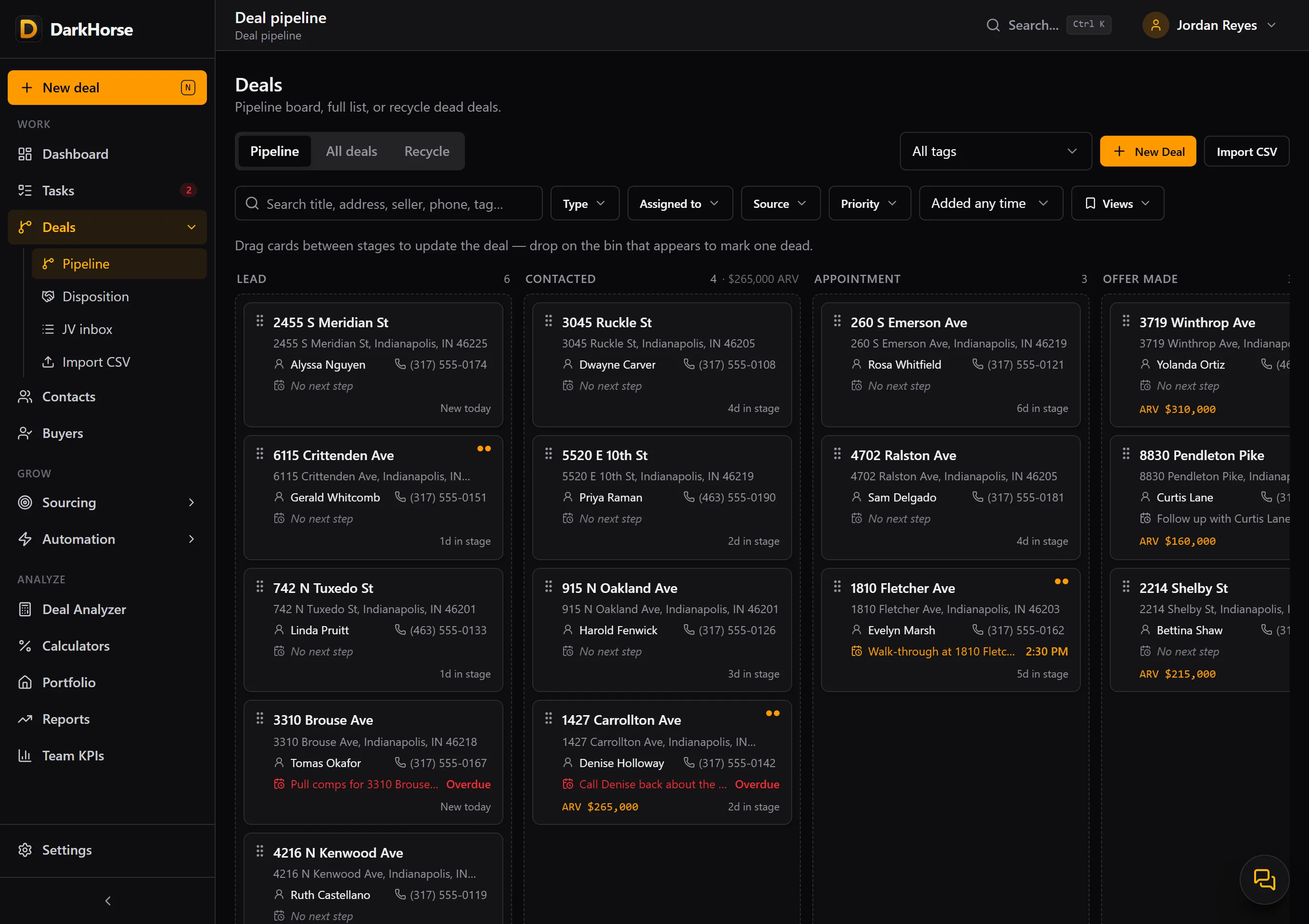
The deal pipeline board, with deals in Lead, Contacted, Appointment, Offer made and Under contract columns.

Bring your own dialer

Calls and texts from the dialer you already use

Connect the Quo, PhoneBurner or JustCall account you already pay for, or point any dialer that can post to a webhook at DarkHorse: BatchDialer, Mojo, Kixie and others, through Zapier, Make or n8n. Your numbers, your account and your carrier registration stay where they are.

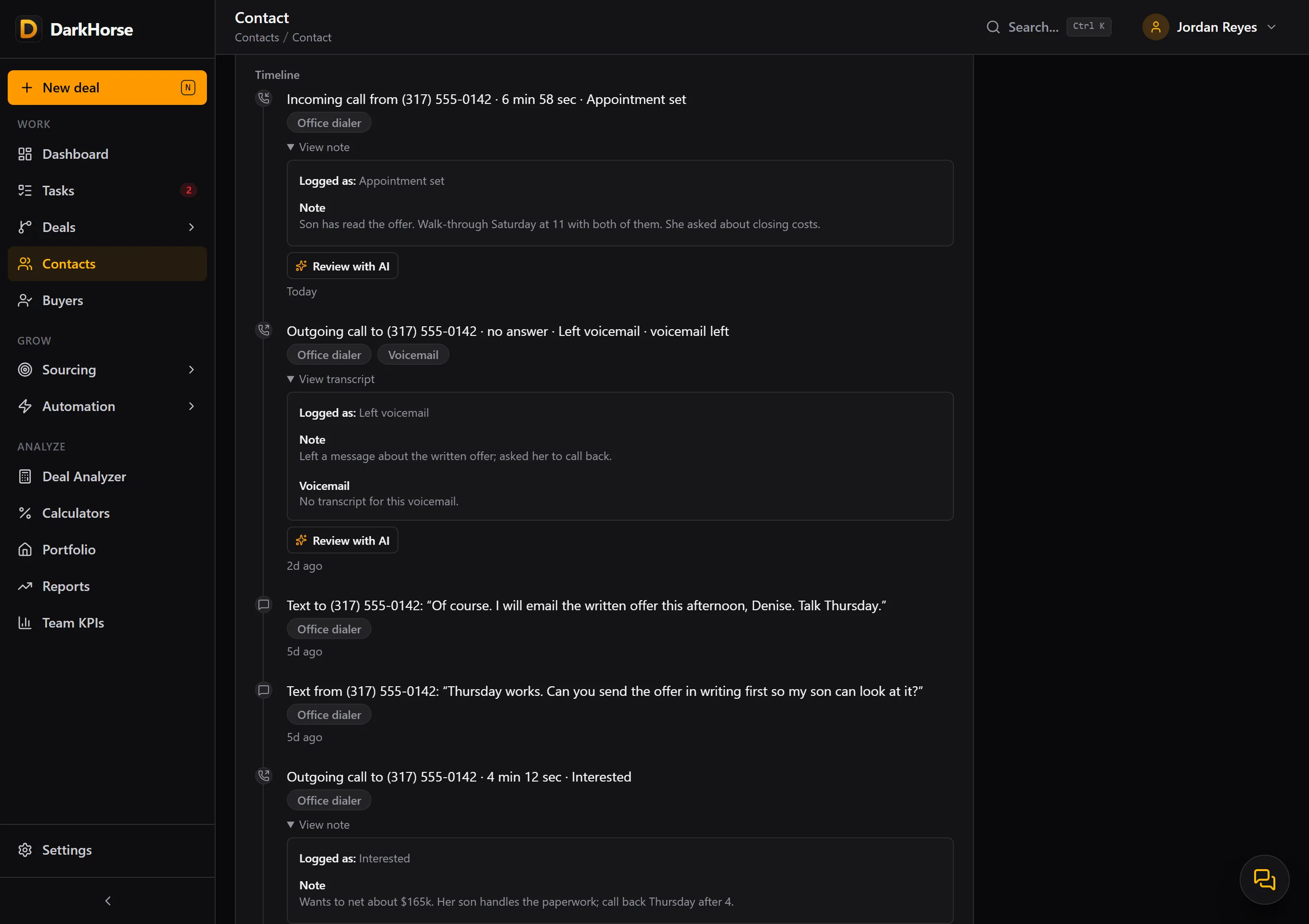
  • Every call and text lands on the contact's timeline with the caller's label and note; texts from unknown numbers are kept so none is lost
  • Your workspace's rules run first: the do-not-contact list, STOP replies, calling hours and state limits, before a call or text starts
  • Decide what a call's label means: a follow-up task, or the deal moved to its next stage
A contact's activity timeline showing calls and texts reported by a connected dialer, with the caller's label and note on each call.

Deal analyzer

Underwrite every exit on one screen

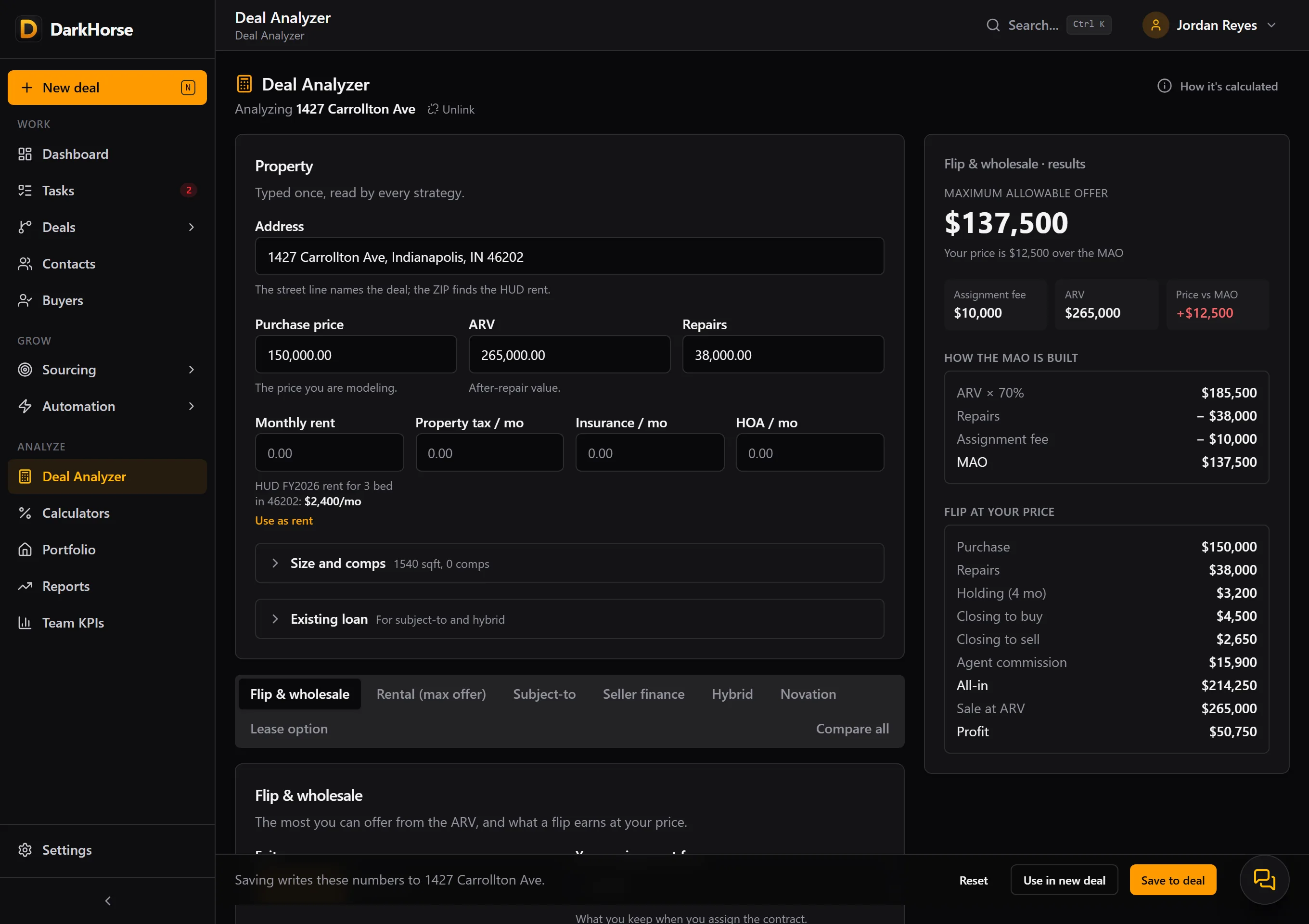
Type the property in once and see flip and wholesale, rental, subject-to, seller finance, hybrid, novation and lease option side by side, with the same math the deal page uses. Hand the numbers to a new deal, or save them back to one you already have.

  • ARV and maximum offer, creative-finance and DSCR models, with a plain-English note on how each number was reached
  • Compare view ranks the strategies the property supports and says what each one still needs from you
  • Payment, amortization, VA entitlement and Section 8 rent calculators on a page of their own
The deal analyzer with a property's numbers on the left and the flip and wholesale results, maximum offer and profit on the right.

Buyers and disposition

A buyer list that tells you who to call first

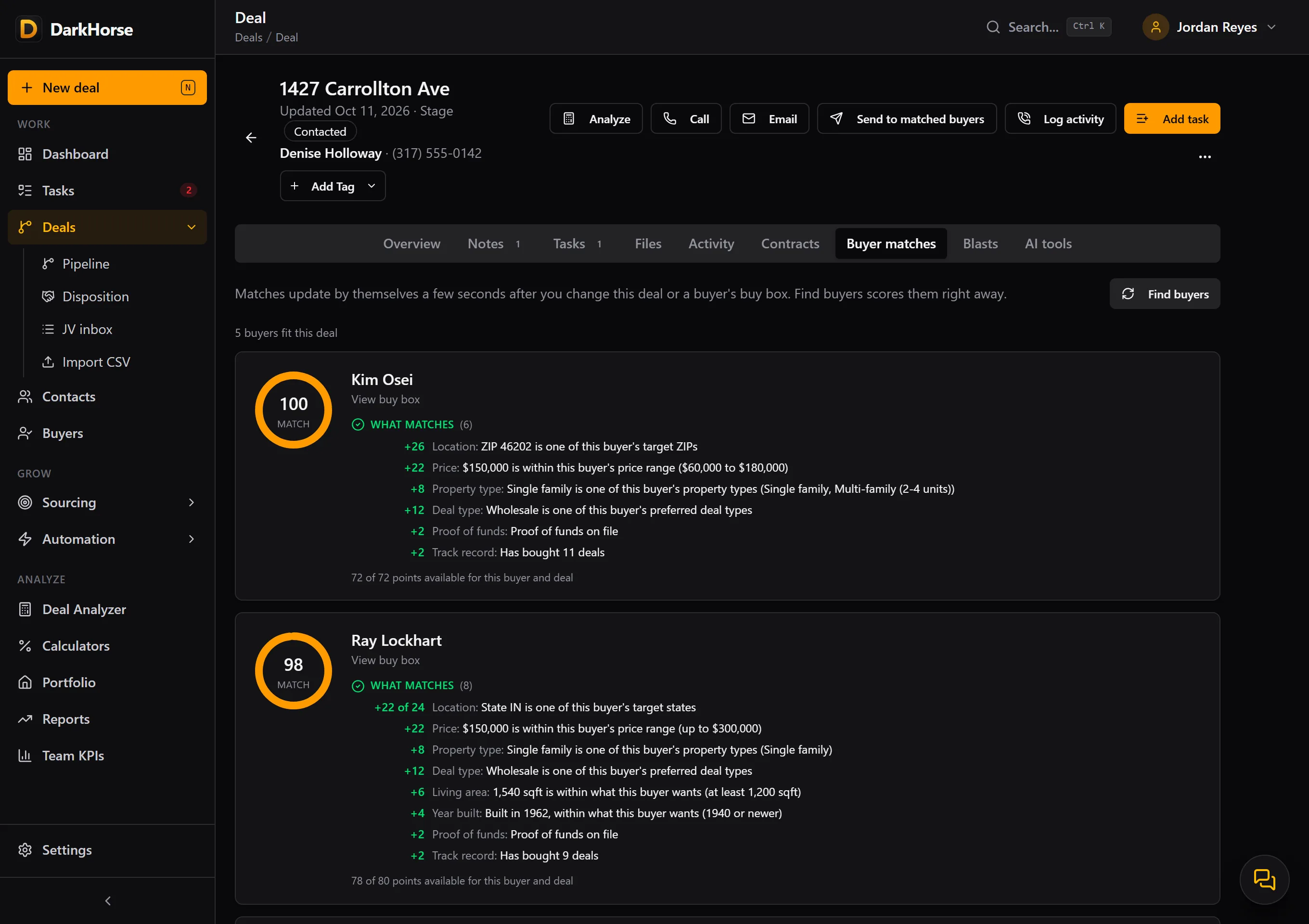
Buy boxes score every live deal on place, price, property type, beds, baths, size and year built, and explain why a buyer matched or was left out. When the contract is signed, send the deal to the buyers it fits in one step.

  • Deal blast: each buyer gets their own email and a private deal sheet, taps interested or not for me, and the answer shows up on the deal
  • Tags, saved segments, and a buyer sign-up form you can embed on your own website
  • A disposition workflow from contract to close, with PSA, assignment and JV contracts as PDFs from templates you can edit
A deal's buyer matches: each buyer scored against the property with the reasons they matched.

One-way calendar sync

Follow-ups and closings in the calendar you already check

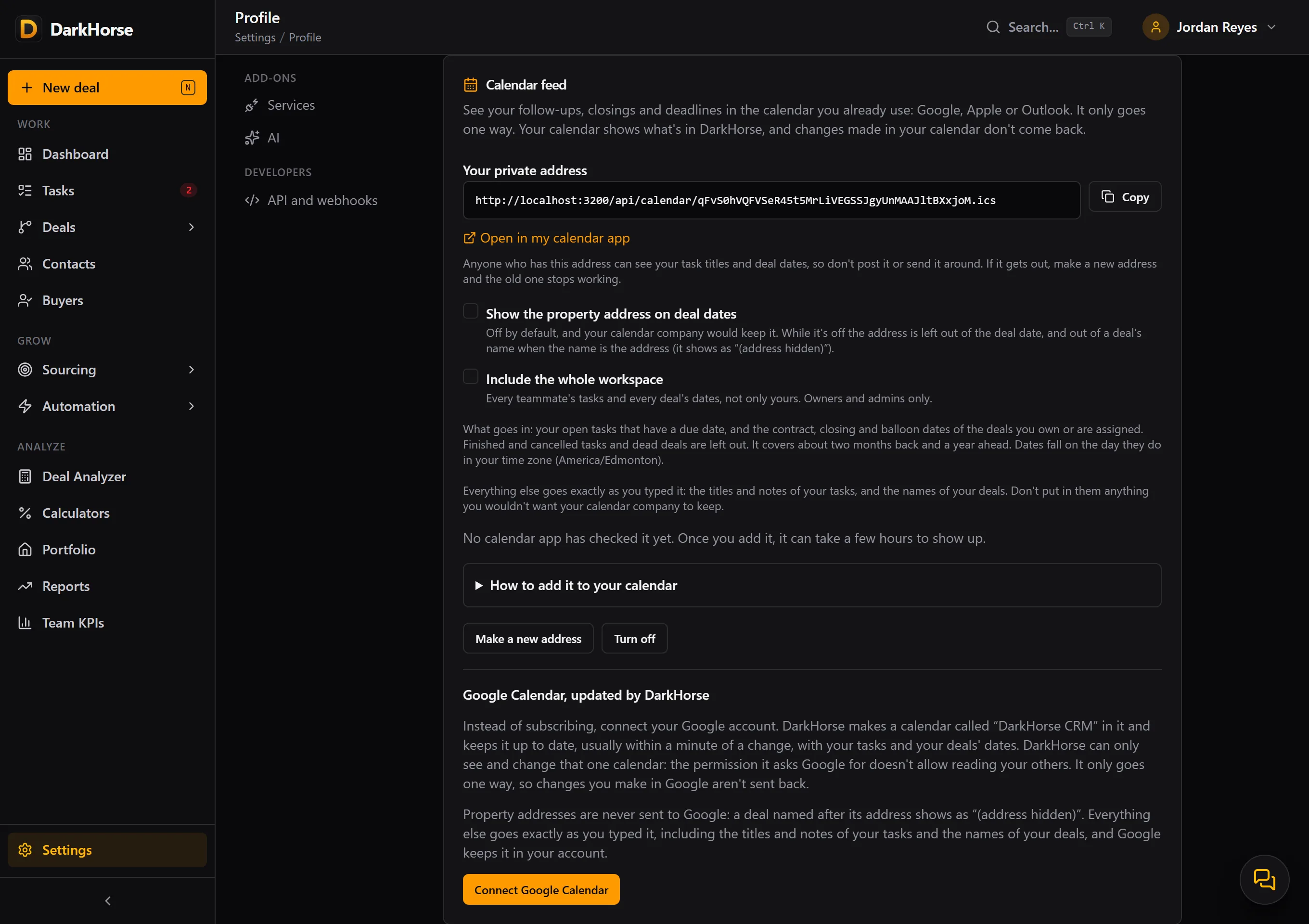
Subscribe Google, Apple or Outlook Calendar to a private address and your open tasks, contract dates, closings and balloon dates show up there and stay current. The sync is one-way on purpose: DarkHorse publishes, your calendar reads, and nothing in your calendar is read or changed.

  • An optional Google Calendar connection keeps a DarkHorse CRM calendar up to date within about a minute of a change
  • Add to calendar on any task or deal date, for the ones that belong on a particular calendar
  • Owners can include the whole team's tasks and deals; property addresses stay out of the calendar unless you ask for them
The calendar settings card with a private feed address for Google, Apple or Outlook Calendar and a Connect Google Calendar button.

Portfolio tracker

Keep an eye on the properties you keep

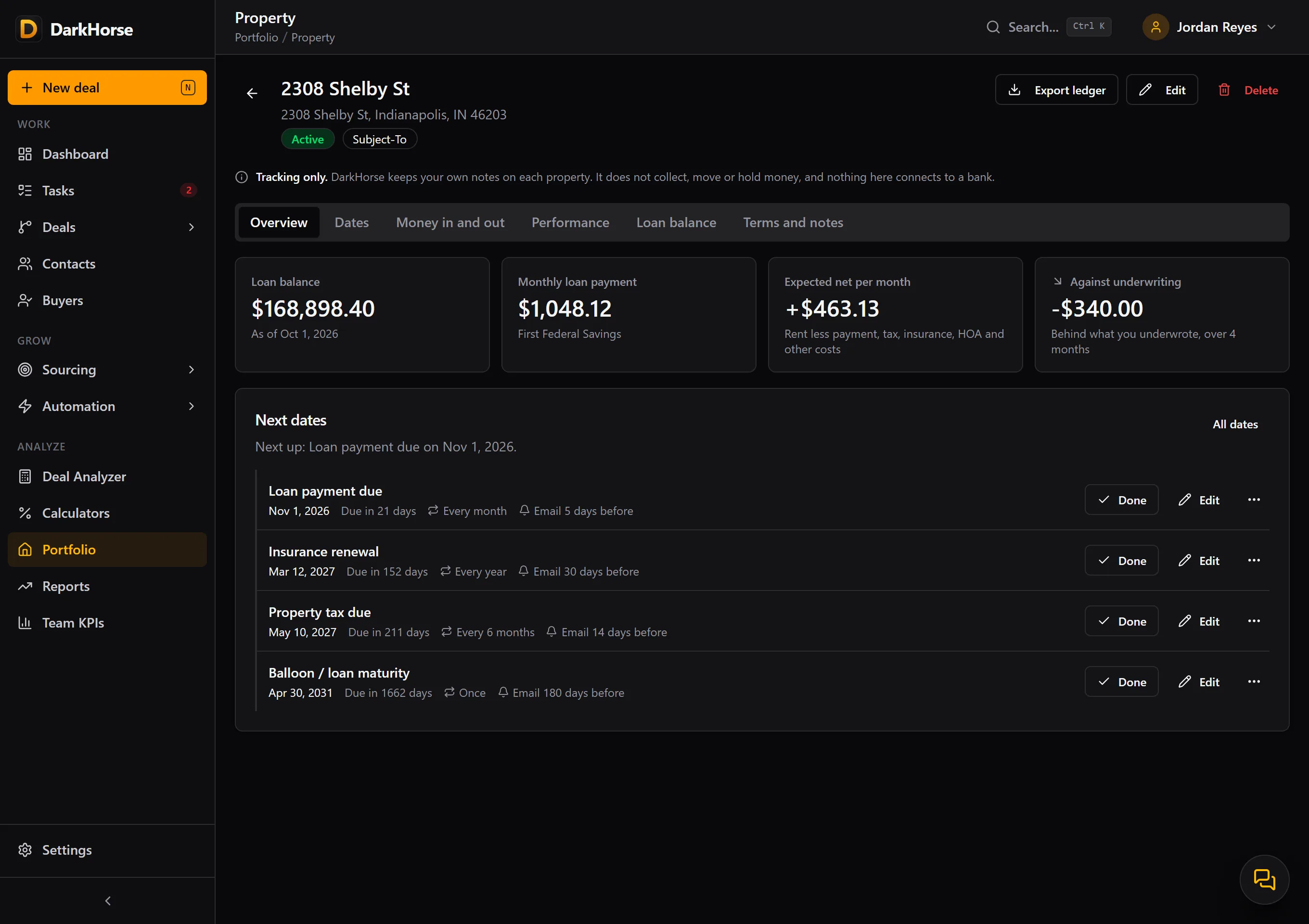
Closed a subject-to, a seller-finance deal or a rental? Add it to the portfolio in one click and the deal's numbers come along. Track the loan balance, every date you must not miss, and what actually came in and went out against what you underwrote.

  • Payment, insurance, tax, balloon and option deadlines, each with its own reminder task that rolls forward when you tick it off
  • Actual versus underwritten, month by month, with a CSV of the whole ledger
  • Tracking only: it never collects, sends or holds money, and it never asks for an account number
A property in the portfolio tracker: loan balance, monthly cash flow against the underwriting, and the dates to remember.

Reports and lead sources

Numbers that answer the questions you actually ask

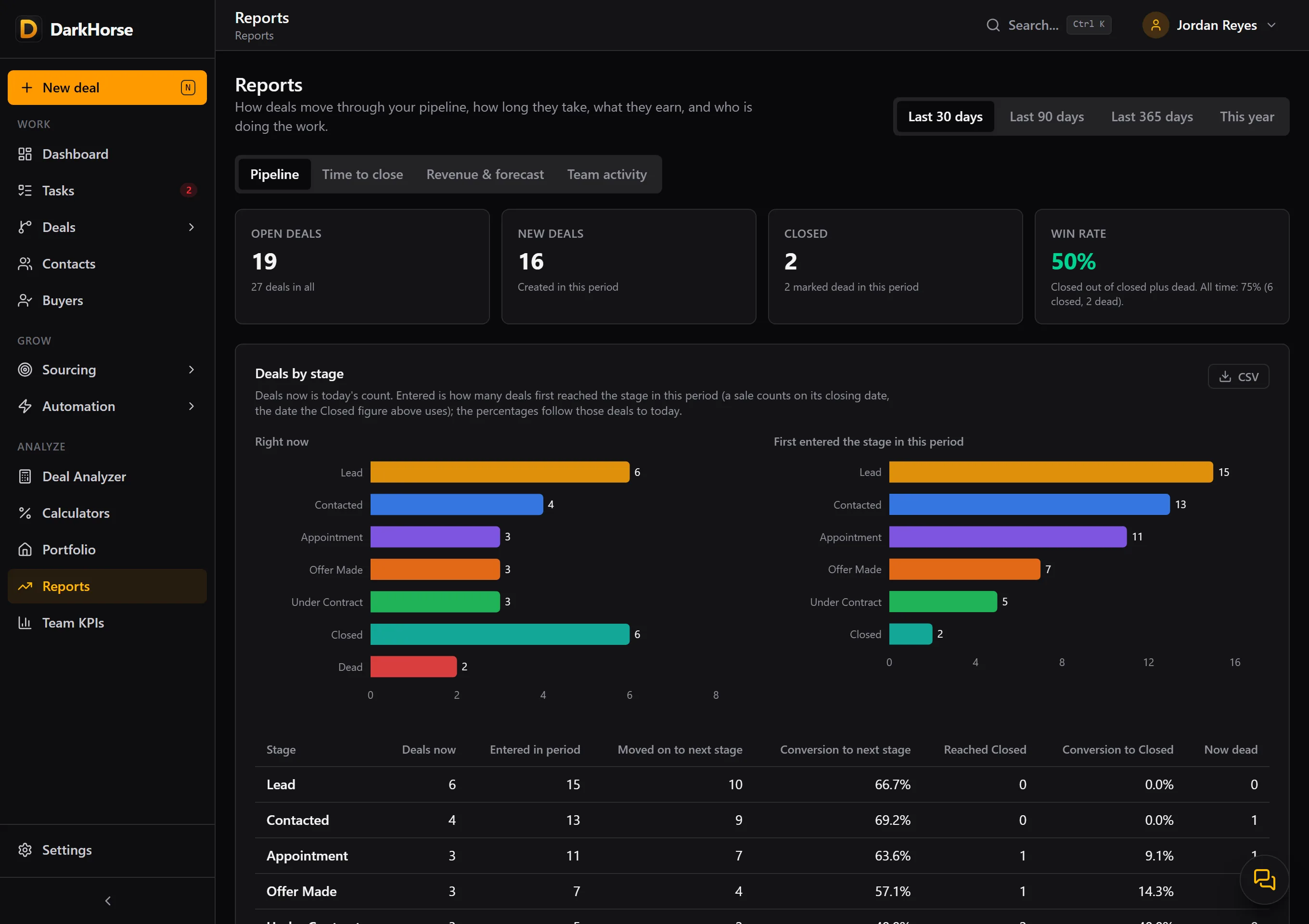
Pipeline and stage conversion, time to close, closed revenue with a fee forecast, and team activity including a connected dialer's calls and texts, for the last 30, 90 or 365 days. Every table downloads as CSV.

  • Lead sources: what each one cost and what its deals earned, as cost per lead, per contract and per closed deal
  • Team KPIs per person, with owner, admin, member and viewer roles
  • Sequences: emails, texts, tasks and calls spaced over days, started by hand or when a deal reaches a stage, stopped when the person replies
The reports page: pipeline conversion by stage, time to close and closed revenue for the last 90 days.

Everything else

The rest of the toolbox

Smaller on the page, not in the day. Each of these is included; none is an add-on.

  • Sequences and templates

    Emails, texts, tasks and calls spaced over days, from templates with merge fields. They stop when the person replies, unsubscribes or the deal moves on.

  • Replies on the timeline

    Connect the inbox you already send from and replies show on the contact with a Reply button. A do-not-email list and an unsubscribe link cover anything automated.

  • Contracts as PDFs

    PSA, assignment, JV, novation, lease option and addenda, filled in from the deal, from templates you can edit. State provisions for 29 states come as drafts for your attorney.

  • Lead forms

    A seller form for your we-buy-houses page and a buyer sign-up form, each with a link and an embed code. Every answer becomes a contact, a lead and a call task.

  • API and webhooks

    A REST API with keys and scopes, an OpenAPI description, and signed webhooks for deals, contacts, tasks, replies and sequences. Zapier and the like connect through them.

  • Teams

    One workspace with owner, admin, member and viewer roles, invites, a shared pipeline, team KPIs and team chat. Your plan includes your seat; add more at checkout or later.

  • AI drafting on your own key

    Seller outreach emails, deal structuring and negotiation replies drafted on each deal with your own Anthropic key, with the token usage shown per deal.

  • Deal files

    Documents and photos on each deal, sorted by kind. Photos are made small on your own device before they are sent, and nothing is ever public.

  • Title Company Directory

    Keep every title company you work with in one shared directory — when a deal's ready to close, send the signed contract straight to them with one click.

  • CSV in, CSV out

    Import leads and buyers with a preview and a 14-day undo. Export deals, contacts, buyers and tasks, and download every report table, whenever you like.

  • JV submissions

    A public form and an inbox that turn a partner's submission into a deal, with the split, role and timeline kept on it.

  • Your data, your call

    Billing through Stripe with a grace period if a payment fails. Download everything from Settings, and delete your account whenever you want.

  • Works on your phone

    Install it on your home screen. Quick capture logs a lead from the property in a few taps, and a lead saved while the signal drops waits on the phone and is sent when it comes back.

On the road

Log a lead from the curb

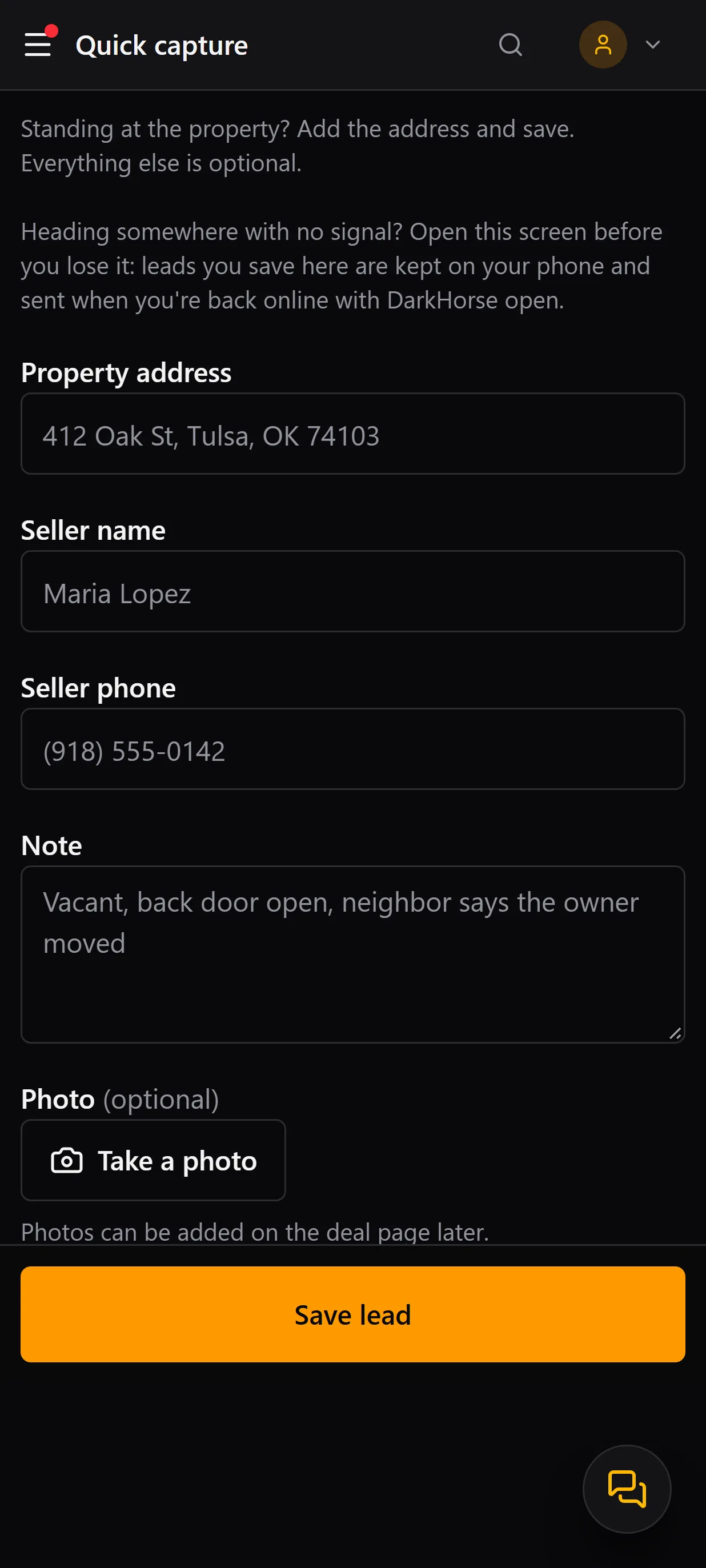
Quick capture is the one screen you need standing in front of a house: the address, the seller's name and number, a note, and Save. It becomes a contact, a lead and a call task before you are back in the car. No signal? Open it before you lose the bars, and the leads you save are kept on the phone and sent the moment it returns.

Quick capture on a phone: a short form to log a lead's address and the seller's details from the property.

Being tested now, off until it is proven

Built and working against stand-in servers, and switched on for customers only once each one has been tried against the real service. Not for sale yet, so not in the price.

  • Do Not Call and litigator checks before every call and text, through a service you already pay for
  • Skip tracing and property data (beds, baths, size, estimates) on your own key
  • Sending a contract for e-signature through your own SignWell account
  • AI call reviews: a call's transcript read for the price, the follow-ups and the next step, each one yours to accept or ignore

Pricing

Every feature on every plan

The product is the same whichever way you pay; the annual plan just costs less, and lifetime is one payment for good. Your plan includes your own seat, and team seats can be added at checkout or later in Settings.

MonthlyPopular

Billed every month

$49/ month

Free for 14 days, then $49 / month. Cancel before the trial ends and you aren't charged.

Flexible: cancel any time from Settings and keep access to the end of the paid month.

  • Deal pipeline with your own stages, tasks with email reminders, and CSV import with a preview and a 14-day undo
  • Contacts and a cash-buyer database with buy boxes, scored matching and one-click deal blasts
  • Deal analyzer for flip, wholesale, rental, subject-to, seller finance, hybrid, novation and lease option, plus calculators
  • Contracts as PDFs: PSA, assignment, JV, novation, lease option and addenda from templates you can edit
  • Title Company Directory: every title company you work with in one shared directory, and the signed contract sent to them with one click
  • Bring your own dialer: Quo, PhoneBurner, JustCall or any tool that posts to a webhook, with calls and texts on the timeline
  • One-way calendar sync to Google, Apple or Outlook Calendar, and an optional Google Calendar connection
  • Portfolio tracker for the properties you keep: balances, key dates with reminders, actual versus underwritten
  • Sequences and email templates, replies from your own inbox, lead forms, reports and lead-source ROI
  • Team workspace with roles, invites, shared pipeline, team KPIs and chat, plus a public API and webhooks
  • AI drafting on your own Anthropic key, and a public JV submission form
Start 14-day free trial

Annual

Billed once per year

$490/ year

$40.83 / month, billed yearlySave 17%

Free for 14 days, then $490 / year. Cancel before the trial ends and you aren't charged.

The same product for less, billed once a year.

  • Deal pipeline with your own stages, tasks with email reminders, and CSV import with a preview and a 14-day undo
  • Contacts and a cash-buyer database with buy boxes, scored matching and one-click deal blasts
  • Deal analyzer for flip, wholesale, rental, subject-to, seller finance, hybrid, novation and lease option, plus calculators
  • Contracts as PDFs: PSA, assignment, JV, novation, lease option and addenda from templates you can edit
  • Title Company Directory: every title company you work with in one shared directory, and the signed contract sent to them with one click
  • Bring your own dialer: Quo, PhoneBurner, JustCall or any tool that posts to a webhook, with calls and texts on the timeline
  • One-way calendar sync to Google, Apple or Outlook Calendar, and an optional Google Calendar connection
  • Portfolio tracker for the properties you keep: balances, key dates with reminders, actual versus underwritten
  • Sequences and email templates, replies from your own inbox, lead forms, reports and lead-source ROI
  • Team workspace with roles, invites, shared pipeline, team KPIs and chat, plus a public API and webhooks
  • AI drafting on your own Anthropic key, and a public JV submission form
Start 14-day free trial

LifetimePay once

One payment, no renewals

$999once

One payment for permanent access. Nothing renews.

Pay once and keep every feature for good, including what we add later. Covers your own seat; there is no free trial on this plan.

  • Deal pipeline with your own stages, tasks with email reminders, and CSV import with a preview and a 14-day undo
  • Contacts and a cash-buyer database with buy boxes, scored matching and one-click deal blasts
  • Deal analyzer for flip, wholesale, rental, subject-to, seller finance, hybrid, novation and lease option, plus calculators
  • Contracts as PDFs: PSA, assignment, JV, novation, lease option and addenda from templates you can edit
  • Title Company Directory: every title company you work with in one shared directory, and the signed contract sent to them with one click
  • Bring your own dialer: Quo, PhoneBurner, JustCall or any tool that posts to a webhook, with calls and texts on the timeline
  • One-way calendar sync to Google, Apple or Outlook Calendar, and an optional Google Calendar connection
  • Portfolio tracker for the properties you keep: balances, key dates with reminders, actual versus underwritten
  • Sequences and email templates, replies from your own inbox, lead forms, reports and lead-source ROI
  • Team workspace with roles, invites, shared pipeline, team KPIs and chat, plus a public API and webhooks
  • AI drafting on your own Anthropic key, and a public JV submission form
Create account to buy lifetime

Want to see it first? We'll walk you through it on a short call.

Book a 15-min demo

Questions

Asked before you ask

Do I need a new phone number or a new dialer?

No. Connect the Quo, PhoneBurner or JustCall account you already have, or point any dialer that can post to a webhook (BatchDialer, Mojo, Kixie and others, through Zapier, Make or n8n) at DarkHorse. Your numbers, your account and your A2P registration stay with the dialer; DarkHorse reads the calls and texts onto your contacts and checks your own rules before a call or text starts.

Is the calendar sync two-way?

One-way, on purpose. DarkHorse publishes your open tasks and your deals' contract, closing and balloon dates to a private address that Google, Apple or Outlook Calendar subscribes to, or to a calendar of its own in Google Calendar. Nothing in your calendar is read or changed, and property addresses stay out unless you ask for them.

Does the portfolio tracker move money?

No. It tracks: loan balances as you read them off a statement, the dates you must not miss, and what came in and went out against what you underwrote. It never collects, sends or holds money, and it never asks for an account, routing or loan number.

Can my team use it?

Yes. Your plan includes your own seat; add team seats at checkout or later in Settings. Teammates get owner, admin, member or viewer roles, a shared pipeline, team KPIs and team chat, and a connected dialer's calls and texts show for everyone who may see the contact.

What does AI cost?

Nothing on top of the plan. AI drafting runs on your own Anthropic key, which you add in Settings, so you pay Anthropic directly for what you use and the usage is shown per deal.

Can I cancel, and can I take my data with me?

Cancel any time from Settings and keep access to the end of the paid period. Download everything from Settings whenever you like, export deals, contacts, buyers and tasks as CSV, and delete your account yourself when you are done.